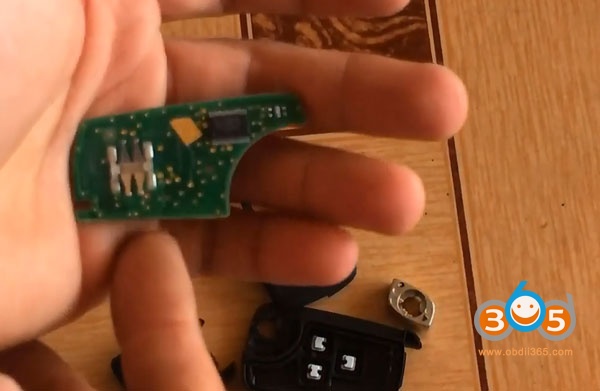
How-to: generate a remote key and program remote control on a Chevrolet Captiva 2013 using VVDI Key Tool and OBDSTAR X300 DP PLUS key programmer.
Tools needed:
A original key
A new universal remote key from Xhorse
VVDI keytool
OBDSTAR X300 DP PLUS/Key Master DP PLUS
Step 1: Generate remote with VVDI Key Tool
In keytool, select Remote/Smart Program->Remote Key->insert universal remote key into coil->America->Chevrolet->Captiva->Captiva 2/3 BTN 433MHz
Press GEN button to generate remote
Generate remote success
Step 2: Program remote with X300 DP PLUS
In X300DP PLUS, select Diag Program->Immobilizer->GM->GM v31.22->Remote->Select from vehicle->Chevrolet->Captiva->2013 up->Add remote
Press LOCK and UNLOCK of the new remote for 10s, then release. Press ENTER to continue.
Program remote success.
Test remote control
Working!!!
Done.
www.obdii365.com
2019/02/24
2019/02/19
How to save OBDSTAR X100 X300M Log Data?
What's the advantages of OBDSTAR data logging?
You can send the log data to OBDSTAR engineer if somthing is wrong with your device.
Here's the guide to save data of OBDSTAR hand-held devices (H-series tools, F-series tools, X100 Pro, X300M etc).
How to save data:
When it fails to communicate or program, please operate as below;
1. Connecting the device - Starting it-Pressing option-Pressing Data Logging-Pressing on-Pressing ESC - Back to the main menu.
2. Keep the device at “on” state, go to test the car, when it fails to do the program. power off the machine please.
3.Pull out the TF card where there is a LOG file.
4. Send us the LOG file and the engineer would analyse the data and figure out the reason.
Note: Every time when you power off the machine, Data Logging would be "OFF
You can send the log data to OBDSTAR engineer if somthing is wrong with your device.
Here's the guide to save data of OBDSTAR hand-held devices (H-series tools, F-series tools, X100 Pro, X300M etc).
How to save data:
When it fails to communicate or program, please operate as below;
1. Connecting the device - Starting it-Pressing option-Pressing Data Logging-Pressing on-Pressing ESC - Back to the main menu.
2. Keep the device at “on” state, go to test the car, when it fails to do the program. power off the machine please.
3.Pull out the TF card where there is a LOG file.
4. Send us the LOG file and the engineer would analyse the data and figure out the reason.
Note: Every time when you power off the machine, Data Logging would be "OFF
loading..
2019/02/12
OBDSTAR X300 DP Plus Read Chevrolet Tahoe 2016 Pin Code
OBDSTAR X300 DP PLUS another success: read pin code on a Chevrolet Tahoe year 2016 no problem.
Select Immobilizer->GM->GM V31.18->Read PinCode->By OBDII->By BCM System->Auto->pre-2016
This function is available by connecting the server. Make sure you have enabled network connection.
Read 4-digit pin code success
http://www.obdii365.com/wholesale/obdstar-x300-dp-plus-full-key-programmer.html
Select Immobilizer->GM->GM V31.18->Read PinCode->By OBDII->By BCM System->Auto->pre-2016
This function is available by connecting the server. Make sure you have enabled network connection.
Read 4-digit pin code success
http://www.obdii365.com/wholesale/obdstar-x300-dp-plus-full-key-programmer.html
loading..
2019/01/27
Renew Cruze smart key 7952E by OBDSTAR X300 DP PLUS
How-to: Renew Chervolet Cruze smart key 7952E by OBDSTAR X300 DP PLUS (Key master DP Plus) tablet.
Chip Type: Chip 46
Smart key type: 7952E
Frequency: 434MHz
Disassemble the remote key
In X300 DP PLUS, select Diag Program-> Renew Key->GM->Buick Smart Key 315MHz->
Keylessgo_13500225_1358425_4keys
Then check the wiring connection
Connect test probe with OBDSTAR P001 adapter and X300 DP PLUS
Press Enter to write data
Renew key success
http://www.key-programmer.org/2019/01/28/renew-chervolet-cruze-7952e-smart-key-by-obdstar-x300-dp-plus/
loading..
2019/01/06
Obdstar X300 DP Plus change mileage on Maserati Ghibli 2014
New test: Obdstar X300DP Plus key master changes km for Maserati the year 2014
Purpose: mileage change
Car: Maserati Ghibli 2014
Odometer correction tool: Obdstar X300 dp plus /key master dp plus
Method: OBD
Video Guide:
Before mileage change:
After mileage correction:
Test:
Km display on the Maserati dashboard
Select Maserati – ghibli
Odometer correction starts…
The function is available by connecting the server.
Pls ensure the internet connection is normal
Input the name of the file to save
The mileage is 40010 km (error does not exceed 200km)?
Press enter to continue
Pls input the new mileage
Masarati odometer correction success!
New km on the dasboard
Result: success!
Obdstar x300dp plus has no issues of Maserati mileage change!
http://blog.obdii365.com/2019/01/07/maserati-ghibli-2014-odometer-correction-with-obdstar-x300-dp-plus/
loading..
Subscribe to:
Posts (Atom)