Showing posts with label OBDSTAR P001. Show all posts

2021/03/08

How to Fix OBDSTAR P001 Purple LED Error?

 Problem:

I tried to read eeprom 24C64 with obdstar x300 dp plus. After connect P001 adapter with x300dp, the LED indicators turns purple instead blue and failed to read.

It works before. Since Obdstar’s last update, the adapter is no longer working. I cannot use it to precode keys and cards.
The led should be blue when it works correctly.

obdstar-p001-purple-led-1

obdstar-p001-purple-led-2

obdstar-p001-purple-led-3

obdstar-p001-purple-led-4

obdstar-p001-purple-led-5

obdstar-p001-purple-led-6

obdstar-p001-purple-led-7

Solution:

For those who have this problem.
We need to force the reset of P001. Problem solved.

The OBDSTAR P001 should be plugged into the obdstar tablet that is off and not powered in 12 volt.

Then plug the 12 volt power supply to obdstar tablet wire x300 DP plus.  (LED on corner of screen must turn on)

The tablet needs to turn on and the P001 will reset at the same time as the tablet starts..

If everything goes well, the P001, will reset in blue and you can use it again.

obdstar-p001-purple-led-solution-1

obdstar-p001-purple-led-solution-2

obdstar-p001-purple-led-solution-3

obdstar-p001-purple-led-solution-4

obdstar-p001-purple-led-solution-5

obdstar-p001-purple-led-solution-6
obdstar-p001-purple-led-solution-7

Now the P001 works perfectly.  Blue light.


http://www.key-programmer.org/2021/03/09/how-to-solve-obdstar-p001-purple-light-problem/

2019/10/29

How to use OBDSTAR X300 DP Plus to Recover IMMO Data?

The goal of the tutorial is to clarify the possibility/potential of the OBDSTAR X300 DP Plus so that makes it in addition to being a key programmer through the software, but he can do the job.

Purpose:
Recover Toyota 2016 24C16 ECU Immo data

What you need:
OBDSTAR X300 DP Plus tablet (with P001 and EEPROM adapter)
External storage device (a USB Card)

Instruction:
Connect P001 with EEPROM adapter, insert USB disk to X300DP plus, then connect P001 with X300DP
obdstar-x300-dp-plus-recover-immo-data-1

obdstar-x300-dp-plus-recover-immo-data-2
Go to X300 DP Plus Home menu->ES File Explorer->SD Card
obdstar-x300-dp-plus-recover-immo-data-3

obdstar-x300-dp-plus-recover-immo-data-4
Long press the data (here 24C16_Toyota_2016_ECU_IMMO_OFF_Data_for_H_Immobilier) you need to recover and copy it to “/Storage.emulated/0/DP/951400041740/DATA”
obdstar-x300-dp-plus-recover-immo-data-5

obdstar-x300-dp-plus-recover-immo-data-6

obdstar-x300-dp-plus-recover-immo-data-7

obdstar-x300-dp-plus-recover-immo-data-8

obdstar-x300-dp-plus-recover-immo-data-9

obdstar-x300-dp-plus-recover-immo-data-10
Select EEPROM function in X300DP Plus
obdstar-x300-dp-plus-recover-immo-data-11
Select PIC/FreeScale adapter V34.06->EEPROM->EEPROM RW (Read/Write)->24CXX Series->24C16
obdstar-x300-dp-plus-recover-immo-data-12

obdstar-x300-dp-plus-recover-immo-data-13

obdstar-x300-dp-plus-recover-immo-data-14

obdstar-x300-dp-plus-recover-immo-data-15

Make sure P001 adapter has connected with X300DP Plus
obdstar-x300-dp-plus-recover-immo-data-16

Reading EEPROM data in process
obdstar-x300-dp-plus-recover-immo-data-17

Save data as bin file
obdstar-x300-dp-plus-recover-immo-data-18
Press Help button to perform data recovery
obdstar-x300-dp-plus-recover-immo-data-19
Select the file desired to restore from /Storage.emulated/0/DP/951400041740/DATA” folder
obdstar-x300-dp-plus-recover-immo-data-20
Recovering data in process
obdstar-x300-dp-plus-recover-immo-data-21
IMMO data recovery success.
Now you can rewrite recovered data to immobilizer to repair ECU.
Hope it helps.

2019/09/02

OBDSTAR X300 DP PLUS Read MG350 Pin Code

How-to: Extract MG350 95160 pin code by OBDSTAR  X300 DP Plus key programmer.

Remove eeprom IC 95160 and solder it to P001 eeprom 3-in-1 adapter
read-mg350-pin-code-with-obdstar-300-1

read-mg350-pin-code-with-obdstar-x300-2


In X300 DP Plus, select Immobilizer->PIC/Freescale-> PIC/Freescale Adapter V34.04->EEPROM->Read Pin Code->MG->MG5->BCM 95160->
read-mg350-pin-code-with-obdstar-x300-3

read-mg350-pin-code-with-obdstar-x300-4

read-mg350-pin-code-with-obdstar-x300-5

read-mg350-pin-code-with-obdstar-x300-6

read-mg350-pin-code-with-obdstar-x300-7

read-mg350-pin-code-with-obdstar-x300-8

read-mg350-pin-code-with-obdstar-x300-9


Make sure OBDSTAR P001 programmer is connected with X300 DP Plus
Reading data in process
Read data success. Save data.
read-mg350-pin-code-with-obdstar-x300-10

Read 4-digit pin code success
read-mg350-pin-code-with-obdstar-x300-11

Done.
You can read MG350 pin code with OBDSTAR X100 Pro and EEPROM/PIC adapter as well.

http://www.key-programmer.org/2019/09/02/read-mg350-pin-code-with-obdstar-x300-dp-plus/

2019/01/27

Renew Cruze smart key 7952E by OBDSTAR X300 DP PLUS

How-to:  Renew Chervolet Cruze smart key 7952E by OBDSTAR X300 DP PLUS (Key master DP Plus) tablet.


Chip Type: Chip 46
Smart key type:  7952E
x300-dp-plus-renew-smart-key-1
Frequency:   434MHz
x300-dp-plus-renew-smart-key-2

x300-dp-plus-renew-smart-key-3
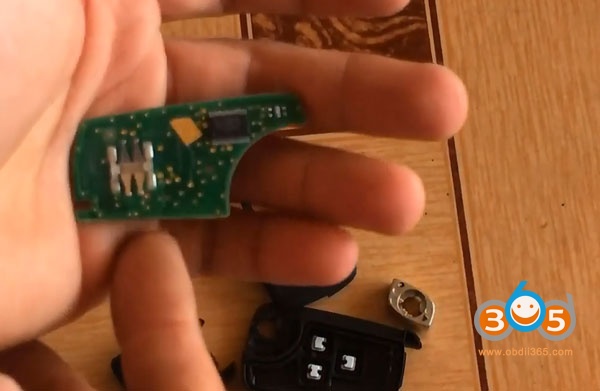
Disassemble the remote key
In X300 DP PLUS, select Diag Program-> Renew Key->GM->Buick Smart Key 315MHz->
Keylessgo_13500225_1358425_4keys
x300-dp-plus-renew-smart-key-4

x300-dp-plus-renew-smart-key-5

x300-dp-plus-renew-smart-key-6

x300-dp-plus-renew-smart-key-7
Then check the wiring connection
x300-dp-plus-renew-smart-key-8

x300-dp-plus-renew-smart-key-9
Connect test probe with OBDSTAR P001 adapter and X300 DP PLUS
x300-dp-plus-renew-smart-key-10

x300-dp-plus-renew-smart-key-11
Press Enter to write data
x300-dp-plus-renew-smart-key-12
Renew key success
x300-dp-plus-renew-smart-key-13

http://www.key-programmer.org/2019/01/28/renew-chervolet-cruze-7952e-smart-key-by-obdstar-x300-dp-plus/