Showing posts with label OBDSTAR iscan ducati. Show all posts

2026/10/11

OBDSTAR Update BMW 8A Motorcycle X_BMS Programming

 OBDSTAR released new BMW and Ducati motorcycle key programming models in September 2026.

Supported Tools

MOTO IMMO SOFTWARE
UPGRADE

BMW [Version: V40.21]
Add below functions for PROXIMITY ID8A X_BMS and BLADE ID4D X_BMS:

  • ECU Info.

  • Coding Operation

  • Program X_BMS

DUCATI [Version: V40.20]
Add below models:

  • Xdiavel V4 E5+

  • Multistrada V4 Rally E5+

  • Multistrada V4 S E5 CHINA

  • Multistrada V4 S E5+

  • Panigale V2 Bulega 2023 World Champion Replica E5

  • Panigale V2 Final Edition E5
    ...

2026/09/03

OBDSTAR Update Ducati Motorcycle till 2026

OBDSTAR update Ducati motorcycle till year 2026.

DUCATI

[Version: V33.30]

  1. Supports models up to the 2026 model year.

  2. Add below models:

  • Xdiavel V4 E5+

  • Multistrada V4 Pikes Peak E5+

  • Panigale V4 E5+

  • Panigale V2 E5+

  • Multistrada V4 Rally E5+

  • Multistrada V2 S E5+

  • Hypermotard 698 Mono E5+

  • Streetfighter V4 E5+

  • Multistrada V4 E5+

  • ...

Supported Tools

Supports models up to the 2026 model year.
Add below models: XDiavel V4 E5+, Streetfighter V4 E5+, Streetfighter V2 E5+
Add special function descriptions (usage scenarios and expected results).
Add transport mode enable/disable function for below models: Scrambler E5/E5+
Add below special function for Panigale V4 E5+:DRL On/Off
Add below special functions for XDiavel V4 E5+:
TPMS registration
TPMS code programming
Oil service
Valve check
Annual service
Next oil service reset
Next valve service reset
Next annual service date modification
Current dashboard date modification
Current dashboard time modification

Add below special functions for Streetfighter V4 E5+:
VIN writing
GPS model configuration
TPS adaption reset
GPS coordinate data synchronization
Throttle balance
Debug package enable/disable
Odometer writing (accumulator)
ABS setting in EOL mode
Debug package reset

Add below special functions for Streetfighter V2 E5+:
Fuel level value reset
Battery voltage history display
Version setting in BBS
Key reset
Next service date adjustment
Gear reset
Battery voltage history reset

OBDSTAR Update Ducati Motorcycle till 2026


2026/05/10

OBDSTAR iScan Fails to Turn On Even with Power Supply Solution

Problem:

OBDSTAR iscan Ducati diagnostic scanner failed to turn on even connected to Power Supply. 


Possible Causes:

Battery is depleted.

Mainboard failure.


Troubleshooting and Solutions:

1. Connect the device to the power adapter and check whether the power indicator light turns on.

    If the indicator light shows red, this indicates the device is charging. Allow it to charge for at least 30 minutes before attempting to power it on again.

        If the device powers on, the issue was caused by a depleted battery. Fully charge the battery to resolve the issue.

        If the device still does not power on, the problem is not battery-related.

    Remove the back cover, disconnect the battery cable, and power the device directly via the mainboard (using the power adapter). Check if the device powers on.

        If it powers on, the battery is faulty and requires replacement.

        If it still does not power on, the issue is unrelated to the battery.

    After ruling out battery issues, the problem is likely due to a faulty Android mainboard. Replacement of the Android mainboard is recommended.

2. If the power indicator light does not turn on at all when the power adapter is connected:

    Try connecting the device to a vehicle's power supply using the OBD main cable. If the indicator light turns on and the device powers up, the power adapter is defective and needs to be replaced.

    If the device still shows no response even when powered via the vehicle:

        The Android mainboard is most likely faulty. Replace the Android mainboard first to eliminate this possibility.

    If replacing the Android mainboard does not resolve the issue, the VCI (Vehicle Communication Interface) mainboard is likely defective and requires replacement.


OBDSTAR iScan Fails to Turn On  1

OBDSTAR iScan Fails to Turn On  2

OBDSTAR iScan Fails to Turn On  3

OBDSTAR iScan Fails to Turn On  4

 Check: How to replace OBDSTAR iscan screen and mainboard?


2026/01/07

OBDSTAR iScan Program 2023 Ducati Multistrada V4S Key

 In this article, we’ll walk through a real-world example of programming both a standard transponder key and a Ducati “red key” for a 2023 Multistrada V4S using the OBDStar Ducati diagnostic tool—a versatile and increasingly popular option for DIY motorcycle maintenance.

OBDSTAR iScan Program 2023 Ducati Multistrada V4S Key 1

A Ducati Multistrada V4S owner found himself in a common predicament: his used bike came with only one key. For security and convenience, he wanted to add both a second transponder key and the important “red key”—Ducati’s master key used for programming and immobilizer functions. Rather than heading straight to the dealer, he turned to an OBDStar iScan Ducati diagnostic tool for around $450 (with a M041 Euro cable).


Why OBDStar?

OBDStar is a multi-brand diagnostic device that supports a wide range of vehicles, including motorcycles. It had already paid for itself once: he used it to reset the bike’s PIN code, which was unknown from the previous owner and not provided by the dealer. Beyond key programming, the tool can also reset service indicators, enable fog light switch and perform various diagnostics—making it a valuable long-term investment for the hands-on rider.

The licence renewal for the OBDStar is a firmware update with new features and the addition of recent new models. Unlike quite a few OBD readers the unit will continue to work, beyond the expiry date, without an update. You’ll only miss out if they add new features for your specific model.

OBDSTAR iScan Program 2023 Ducati Multistrada V4S Key 2

Step-by-Step: Programming New Ducati Keys


1.Preparation

Connect a battery charger to ensure stable voltage during the procedure—a crucial step to avoid interruptions.

The OBDStar was plugged into the Euro5 diagnostic port under the seat (though wiring from accessories like lights and horn controllers made access a bit crowded).


OBDSTAR iScan Program 2023 Ducati Multistrada V4S Key 3

2. Accessing the Key Programming Function

With the ignition on, he navigated through the OBDStar iscan menu:

Moto Diag – Ducati – Diagnosis

After auto-identifying the bike and reading the VIN, he selected Manual Selection – Hands Free (Smart Key) – Special Functions-Storing Keys

OBDSTAR iScan Program 2023 Ducati Multistrada V4S Key 4

OBDSTAR iScan Program 2023 Ducati Multistrada V4S Key 5

OBDSTAR iScan Program 2023 Ducati Multistrada V4S Key 6

OBDSTAR iScan Program 2023 Ducati Multistrada V4S Key 7

OBDSTAR iScan Program 2023 Ducati Multistrada V4S Key 8

OBDSTAR iScan Program 2023 Ducati Multistrada V4S Key 9

3. Authentication and Key Association

The system prompted him to authenticate using an original key first, placed near the antenna (located under the tank, marked with a small antenna symbol).

Importantly, he noted that after authentication, all keys—including the original—must be reprogrammed.

He then followed on-screen instructions to associate each key one by one:

First the new transponder key

Then the original key

Finally the red key

OBDSTAR iScan Program 2023 Ducati Multistrada V4S Key 10

OBDSTAR iScan Program 2023 Ducati Multistrada V4S Key 11

OBDSTAR iScan Program 2023 Ducati Multistrada V4S Key 12

OBDSTAR iScan Program 2023 Ducati Multistrada V4S Key 13

OBDSTAR iScan Program 2023 Ducati Multistrada V4S Key 14

OBDSTAR iScan Program 2023 Ducati Multistrada V4S Key 15

OBDSTAR iScan Program 2023 Ducati Multistrada V4S Key 16

OBDSTAR iScan Program 2023 Ducati Multistrada V4S Key 17

4. Complete

Once all keys were recognized, he selected “Store into the control unit.”

The process completed successfully, and all keys were ready to use.


Tips for Success

Hold keys near the antenna: The antenna location is typically under the fuel tank near the ignition. Look for a small antenna icon or refer to your bike’s manual.

Keep keys separated during programming: This avoids signal interference and ensures each key is recognized individually.

Use a battery charger: Preventing voltage drop is critical during ECU communication.

Follow translations carefully: Some menu items may be translated awkwardly. When in doubt, follow the logical flow—authentication first, then programming of all keys.


Conclusion:
The OBDStar allowed him to:

  • Reset the bike’s PIN
  • Program two new keys
  • Retain the ability to reset service lights
  • Much more.

While the device requires an annual subscription after the first 18 months (around $80), the savings from just one key programming or PIN reset can justify the cost. For Ducati owners—and riders of other Euro5-compliant bikes—the OBDStar represents a powerful entry into advanced DIY motorcycle maintenance.

Whether you’re adding a spare key, replacing a lost one, or just want more control over your bike’s electronics, tools like OBDStar are making professional-level diagnostics accessible in the home garage.

2026/01/06

OBDSTAR iScan Reset 2020 Ducati superleggera V4 Service Light

How to reset Ducati Service Light correctly?

After completing scheduled maintenance on a 2020 Ducati superleggera V4, I needed to reset the service light. The indicator on the dash looked like a book icon, which typically represents a general service reminder.
When I connected my OBDSTAR iScan Ducati diagnostic tool to perform the reset, I noticed that the service reset menu for this model includes multiple reset options—such Annual service light reset, Oil service light reset, and others.

At first, I selected the Oil Service function, but the reset failed. Later I found out that the illuminated warning was actually for the Annual Service, not the oil change. Once I selected the correct reset option, the reset completed successfully.

Compared to other brands, Ducati’s service reminder system is a bit more complex—each type of service has its own independent reset procedure. So before attempting a reset, it's crucial to first identify exactly which type of service light is active.
OBDSTAR iScan Reset 2020 Ducati superleggera V4 Service Light


2025/08/11

OBDSTAR iScan Ducati and Topscan Moto Which is Better?

 OBDSTAR iScan Ducati and Topdon Topscan Moto are two standout tools for Ducati motorcycles.  Which one is better?

Here comes the tool comparison:

Overview:

  • OBDSTAR iScan Ducati
    • A dedicated, standalone Android tablet designed specifically for Ducati motorcycles.
    • Offers professional-grade diagnostics, key programming, and advanced functions tailored for Ducati models up to 2024.
    • Ideal for enthusiasts, professional mechanics, or those seeking a comprehensive, Ducati-specific tool without reliance on external devices.
  • Topdon TopScan Moto
    • A compact, Bluetooth-enabled OBD-II dongle that pairs with a smartphone app (TopGuru/TopScan) for diagnostics.
    • Supports multiple motorcycle brands (including Ducati, BMW, Harley, Honda, Kawasaki, Suzuki, Yamaha, with more to come) and is designed for portability and ease of use.
    • Geared toward DIY riders, casual enthusiasts, and those who prefer a budget-friendly, multi-brand solution.
Comparison

Feature
Topdon TopScan Moto
Device Type
Standalone Android tablet (5.0-inch capacitive touch screen, RK3128 quad-core processor)
Bluetooth dongle paired with smartphone app (iOS/Android)
Ducati Compatibility
Comprehensive support for Ducati models up to 2024, including Euro 4 and Euro 5 bikes
Supports Ducati, BMW, Harley, Honda, Kawasaki, Suzuki, Yamaha, with more to come
Diagnostic Functions
– Code reading/clearing
– Live data streaming
– Action tests
– ECU coding/programming
– Service light resets (oil, annual, Desmo)
– Key programming
– TPMS, CO adjustment, idle speed, A/F value reset, ABS settings, etc.
– Full-system diagnostics (engine, ABS, smart key, etc.)
– Code reading/clearing
– Active tests (varies by make)
– Oil maintenance resets
– Service indicator adjustments
Advanced Functions
– Key programming
– Odometer recalibration (optional license)
– Accessory activation (e.g., fog lights, grip heaters for Multistrada V4 S 2022)
– Gear sensor learning
– DQS functionality test
Limited advanced functions;
primarily focused on diagnostics and basic maintenance resets
(no key programming or odometer recalibration)
Ease of Use
Intuitive menu, but requires some learning for advanced functions;
no smartphone needed
User-friendly app interface, ideal for beginners;
requires smartphone and app setup
Portability
Larger (198mm x 115mm x 31mm, ~700g); less portable but self-contained
Compact (84.1mm x 50.4mm x 27.2mm, 78g); highly portable, relies on smartphone
Cost
~$389–$450 (with M041 cable for Euro 5 bikes);
more expensive upfront
~$100; lower initial cost, but requires $99.99/year subscription after first year
Subscription/Updates
One year of free updates;
$80/year thereafter for new models/features
One year of free updates; $99.99/year thereafter;
Software access expires without renewal
Cables/Adapters
Includes M001A main cable, M037 (4-pin), N004 (3-pin); M041 (6-pin Euro 5) sold separately
Requires specific cables (e.g., M010 for 6-pin, M012 for 4-pin Ducati); not included
Multi-Brand Support
Ducati-specific only; cannot add other brands
Supports multiple brands (BMW, Harley, Honda, Kawasaki, Suzuki, Yamaha, more coming)
Language Support
English, Spanish, Portuguese, French, German, Italian
Not specified, but app likely supports multiple languages
Connectivity
Wi-Fi for updates; no internet required for diagnostics
Bluetooth 5.0; requires smartphone and potential internet for app functionality
Support
One-click remote assistance via TeamViewer;
detailed help data/technical bulletins
One-click feedback via app; 
Which is Better for Ducati?

The OBDSTAR iScan Ducati is a robust Android-based tablet that offers automatic VIN recognition, module programming and coding (including headlight and ECU), active tests, service light and DESMO resets, and key programming. It supports Ducati models up to 2024 and requires an M041 cable for 2019 and newer bikes.

Meanwhile, the TOPDON TopScan Moto, a compact Bluetooth dongle for iOS/Android, also features auto-VIN recognition, system-wide diagnostics (including headlights), active testing, and service functions. Ducati-specific adapter cables (M010/M012/M034) are included.


Choose OBDSTAR iScan Ducati if:

  • You own or primarily work on Ducati motorcycles and need a professional-grade tool for comprehensive diagnostics, key programming, or accessory activations.
  • You prefer a standalone device that doesn’t rely on a smartphone or internet for operation.
  • You’re comfortable with a higher upfront cost and want long-term reliability with optional updates ($80/year after first year).
  • You need advanced features like ECU coding, gear sensor learning, or odometer recalibration (with license).

Choose Topdon TopScan Moto if:

  • You’re a DIY rider or casual enthusiast looking for an affordable (~$100), portable diagnostic tool for basic tasks like code reading/clearing and service resets.
  • You own or work on multiple motorcycle brands (e.g., Ducati, BMW, Harley) and want a versatile tool.
  • You’re comfortable with a smartphone-based interface and Bluetooth connectivity.
  • You’re okay with the subscription model ($99.99/year after first year) and don’t need advanced features like key programming or accessory activations.


Bottom line: choose the OBDSTAR tablet for full workshop-grade module programming and comprehensive coding tasks; go with TOPDON’s mobile-friendly dongle if you want portability, ease of use, and reliable headlight VIN matching at a lower cost.


If you need a standalone Topdon motorcycle scanner, check Topdon Artidiag Moto or UltraDiag Moto.

Topdon TopScan Moto vs ArtiDiag Moto vs UltraDiag Moto

2024/10/30

OBDSTAR iScan Ducati Review on Panigale V4 2021 Bike

OBDSTAR iSCAN Ducati diagnostic scanner is an absolute game changer for all Ducati owners!. We are able to service our bikes ourselves as enthusiasts.  The scanner allows us to get access into the ECU to turn off the service lights and do other diagnostic functions that are available electronically.


We jsut have already changed the oil and now just want to take care of the electronics.

Hook it up on your bike. We’re going to be able to reset our service intervals on our Panigale V4.

Click on Motodiag. Go into your settings firt. Make sure you are connected to the WiFi.

Click Ducati. Choose the latest Ducati software version.

Make sure your bike ignition is on.

We’re going to go to diagnosis you could go to auto identify your VIN number. It already read the VIN of the bike and so what it’s telling me right now it can’t pick the bike based off the VIN number because it’s a newer bike. So we’ll just click okay and then in here you could pick the type of bike you have and the first letter of it so this is a  Panigale V4. We pick P and it’s Euro 5 bike, so choose Panigale V4 E5 and obviously it picks it here model year 2021. Don’t forget 2021 for Europe is 2022 for the US. It is a Euro V model, so you need an extra M041 Ducati adapter.

OBDSTAR iScan Ducati Review on Panigale V4 2021 Bike 1

OBDSTAR iScan Ducati Review on Panigale V4 2021 Bike 2

We click okay and in here it has all your control modules, engine, ABS, BSS etc. Scroll down you will see that we have the service lamp reset. We click Model 21, in here you could read all your ECU information and you could go into your Special functions.

OBDSTAR iScan Ducati Review on Panigale V4 2021 Bike 3

OBDSTAR iScan Ducati Review on Panigale V4 2021 Bike 4

OBDSTAR iScan Ducati Review on Panigale V4 2021 Bike 5

There’s a disclaimer and then it says password 1 2 3, just to make sure that you agree with going forward into the special functions menu. Click okay right here as you see there’s a lot of options that you get which is great. So you could see the date in the dashboard, your next annual service date. It is our first service so there’s not going to be anything demo service light reset.

OBDSTAR iScan Ducati Review on Panigale V4 2021 Bike 6

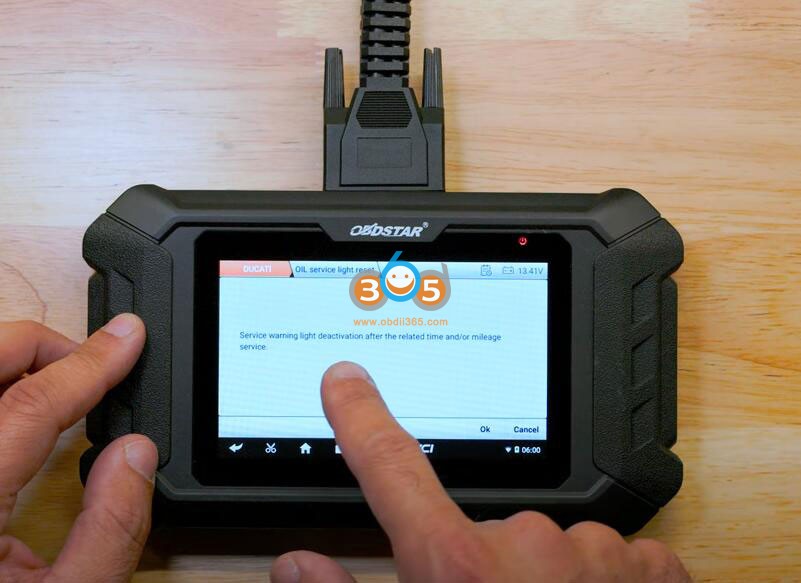
So we want to First. Do the oil service light reset. Press OK to continue service warning light deactivation after the related time and or mileage service.

OBDSTAR iScan Ducati Review on Panigale V4 2021 Bike 7

The new expiration date will be stored so this is saying that it’s going to put it a year down the line.

We are going to click OK and that’s 161124.

OBDSTAR iScan Ducati Review on Panigale V4 2021 Bike 8

Don’t forget these European devices put the day month and then the year. That’s why it is 1611 and not 1116. You click OK and it says procedure completed. It is all done. We’ve reset our service light.

OBDSTAR iScan Ducati Review on Panigale V4 2021 Bike 9

We put it for a year down and we could go to the annual service light deactivation.

What else you could do with thus device? You can read your DTCs which is your engine fault codes. This bike does not have any right now. If it did you could clear it.

OBDSTAR iScan Ducati Review on Panigale V4 2021 Bike 10

You could see your ECU information if you wanted to see anything specifically in your ECU this is a good thing to have. If you are buying a used bike and you want to make sure all the VIN numbers of your black-box your ECU and your dash are matching, this is something very important. So you know that you are getting a legitimate bike.

OBDSTAR iScan Ducati Review on Panigale V4 2021 Bike 11

If you go back you log out of that service lamp reset side of things we could go into the ECU which is our engine control unit and we could be running some of the commands over here.

You could see your ECU information again. You could read any engine fault codes. You could actually do a live data login. This is very useful and then you could do active tests. We want to do fuel pimp. Let’s click fuel pump. It should technically be able to activate the fuel pump.

OBDSTAR iScan Ducati Review on Panigale V4 2021 Bike 12

OBDSTAR iScan Ducati Review on Panigale V4 2021 Bike 13


OBDSTAR iScan Ducati Review on Panigale V4 2021 Bike 14

OBDSTAR iScan Ducati Review on Panigale V4 2021 Bike 15

OBDSTAR iScan Ducati Review on Panigale V4 2021 Bike 16

You could do a lot of things here.

Then in the special functions. You could do the Adaptive reset of your TPS which is throttle position sensor and all the other stuff that you could reset is in here like your transmission values ,A/F self-adaptive, idel control adaptive, knock sensor adaptive.

OBDSTAR iScan Ducati Review on Panigale V4 2021 Bike 17

Let’s get out of the engine control unit. If enter ABS you could do activate test. If go into Special functions we could actually run the ABS pump which it going to help bleeding your system a lot easier.

We should read fault codes of the ABS unit.

OBDSTAR iScan Ducati Review on Panigale V4 2021 Bike 18

Go back into Meter section. You can do oil light service reset, reset your pin code. Some said the mileage correction function is not working. It’s not true. You have to activate mileage license to use this function.

OBDSTAR iScan Ducati Review on Panigale V4 2021 Bike 19

Let’s go into BBS system which is out black-box. You can also read ECU info, view live data, do active test and perform special functions.

You could enable your anti-theft or heated grips which is pretty cool because anti- theft if you are building a track bike it’ll be very useful it has a bunch of calibrations and stuff.

OBDSTAR iScan Ducati Review on Panigale V4 2021 Bike 20

Let’s see advance functions which is something different the other it ask to enter password 12345678.

OBDSTAR iScan Ducati Review on Panigale V4 2021 Bike 21

OBDSTAR iScan Ducati Review on Panigale V4 2021 Bike 22

You could synchronize your instrument cluster to your blackbox unit. If you had a dash failure and you got to change your dash it’s useful.

OBDSTAR iScan Ducati Review on Panigale V4 2021 Bike 23

The function is not something that usually is available to end consumers just for security measures and if you look here there’s a couple more things like the suspension control unit we already went into the service lamp reset function.Also you could set your Bluetooth for these bikes that have Bluetooth connectivity.


Previously, Ducati bikes were at the mercy of dealerships and shops for removing the pesky service lights, but there is finally a solution out there for the guys who like to work on their own bikes. With the OBDStart iScan, we can now reset all service lights, check codes, run ABS pumps (this helps greatly with bleeding brakes), and much more!

So the OBDSTAR iScan Ducati scanner is able to reset service lights also it does a lot of other diagnostic features.


http://blog.obdii365.com/2024/10/30/obdstar-iscan-ducati-panigale-v4-e5-2021-service-light-reset/