Showing posts with label OBDSTAR RH850 adapter. Show all posts

2025/10/10

OBDSTAR G3 Program Mitsubishi Outlander 2022 All Keys Lost

 Mitsubishi Outlander 2022 all keys lost is done by OBDSTAR G3 + C4-06 Adapter.

Remove HFM module, read 28-digit pin code with RH850 C4-06 adapter.

Then generate dealer key and learn key with G3.

OBDSTAR G3 Program Mitsubishi Outlander 2022 All Keys Lost 1

OBDSTAR G3 Program Mitsubishi Outlander 2022 All Keys Lost 2

OBDSTAR G3 Program Mitsubishi Outlander 2022 All Keys Lost 3

OBDSTAR G3 Program Mitsubishi Outlander 2022 All Keys Lost 4

For the detailed procedure, check here

OBDSTAR G3 Read 2021- Mitsubishi Outlander HFM Pin Code with RH850 Adapter

2025/06/19

OBDSTAR G3 Read Nissan Sentra B18 PIN Code via HFM Dump

 OBDSTAR will add smart key to Nissan Sentra/Rogue 2021- without pin code. But if all keys have lost, it will ask for 28-digit pin code.

OBDSTAR G3 will calculate pin code from HFM (hands-free module) dump using the new RH850/V850 adapter kit.


Supported models:

Nissan SYLPHY/SENTRA B18, X-TRAIL/ROGUE T33, JUKE 2020-, PATHFINDER 2021-, QASHQAI 2021-, NOTE E-POWER, RS3, NP300 2029-, etc;


Supported processors:

Proximity key: HFM R7F70101393 and R7F7010253.
Blade key: BCM R7F701056, R7F701057, R7F701042


Tool requirement:

OBDSTAR X300 Classic G3 or X300 Pro4 (Key Master 5)

OBDSTAR MP001 programmer

OBDSTAR RH850 adapter (C4-06 adapter)


Remove hands-free module HFM above the glove compartment. Here is the tip to remove the HFM module from car.

OBDSTAR G3 Read Nissan Sentra B18 PIN Code via HFM Dump 1

Go to Nissan IMMO software and navigate to 28 digital pincode function.
There are two types of IMMO systems,
Type 1 (B18)
Type 2 (T33)

OBDSTAR G3 Read Nissan Sentra B18 PIN Code via HFM Dump 2

OBDSTAR supports pin code reading via HFM dump and write HFM coding functions for both B18 and T33 chassis.

OBDSTAR G3 Read Nissan Sentra B18 PIN Code via HFM Dump 3

OBDSTAR G3 Read Nissan Sentra B18 PIN Code via HFM Dump 4

Here is a 2023 Nissan Sentra B18 model.

Select Type 1 (B18).
Select Read PinCode (C4-06) function.
Select processor type: R7F7010193.

OBDSTAR G3 Read Nissan Sentra B18 PIN Code via HFM Dump 5

Device will ask to connect MP001 programmer with OBDSTAR G3.
Hit “Guide” to check instructions and wiring diagrams.

OBDSTAR G3 Read Nissan Sentra B18 PIN Code via HFM Dump 6

OBDSTAR G3 Read Nissan Sentra B18 PIN Code via HFM Dump 7

Disassemble the HFM module.

OBDSTAR G3 Read Nissan Sentra B18 PIN Code via HFM Dump 8

Connect C4-06 adapter to HFM module and MP001 programmer according to the wiring diagram.
Don’t forget to connect 12V power supply to MP001 programmer.

OBDSTAR G3 Read Nissan Sentra B18 PIN Code via HFM Dump 9

OBDSTAR G3 Read Nissan Sentra B18 PIN Code via HFM Dump 10

Connecting to MCU and start reading data.

OBDSTAR G3 Read Nissan Sentra B18 PIN Code via HFM Dump 11

OBDSTAR G3 Read Nissan Sentra B18 PIN Code via HFM Dump 12

Read 28-digit pin code successfully.

OBDSTAR G3 Read Nissan Sentra B18 PIN Code via HFM Dump 13

Then you can go “all keys lost (via loaded data)” to learn key with the pin code.

2025/06/17

OBDSTAR G3 Query Historical MQB IMMO Data Function

 OBDSTAR X300 Classic G3/Key Master5/X300 Pro4 has updated its VAG MQB IMMO software to version V45.12. This new version adds the feature of querying historical immobilizer data for MQB instrument clusters and reading ECU information.


What does the MQB Query Historical IMMO Data function do?


Now, for any MQB vehicle that has all keys lost programmed (has calculated sync code for AKL) using the G3/Key Master5 and RH850 adapter kit, when you connect this car via OBD again, the device acts like a dedicated archive for this car. There’s no need to read the original vehicle data again or wait for online calculations—it automatically identifies the vehicle and directly retrieves the historical immobilizer data. Just go ahead to generate dealer key and learn key. Generating dealer keys becomes as easy as checking a contact list.


Additionally, the new ECU information feature provides more accurate engine details, helping users better understand the vehicle’s status.

OBDSTAR G3 Query Historical MQB IMMO Data


2025/05/27

OBDSTAR G3 Renault Clio 5 All Keys Lost with RH850 Adapter

 Question: Is it possible to program Renault Clio 5 MY2020 smart key when all keys lost with OBDSTAR X300 Classic G3?  Just unlocked the gateway, will G3 program the smart key card directly into the OBD port?


No, If add key you can use 16+32 gateway cable. It works well.

For example:

Read Clio V 28-digit pin code and add a new card by using bypass in gateway without any problem.

OBDSTAR G3 Renault Clio 5  add key

But it cannot do all keys lost via the gateway adapter.


G3 will program Clio 5 all keys have lost with the new RH850 adapter.

Here comes the real user feedback:

“Test completed. AKL is only possible to get with the pin code via C4/06 cable.  Successfully read the pin code from a Clip 5 BCM R7F701056 using the OBDSTAR G3. You will see BCM connection diagram in the device. Work perfectly. abrites off course easy but just activation for renaults are few times more expensive then obdstar g3..for all brands.”‘

OBDSTAR G3 Renault Clio 5 AKL

2025/05/23

What Tool to Program Renault New Zoe 2020 All Keys Lost

 Have an all lost keys situation in a Renault New Zoe 2020. What device can do it?


1). With OBDSTAR


Autel server is down. So we can’t read pin code from HFM dump with Autel and APB131.

OBDSTAR released a new RH850 adapter to read HFM hands free module data. We can read 28-digit pin code from HFM with OBDSTAR X300 Classic G3/X300 Pro4 and the RH850 adapter.

The HFM module is located on top of the heater matrix. When sitting in the car it’s right behind the middle console ventilation outlets. Its a pain to take it out, but its there.

Program Renault New Zoe 2020 All Keys Lost

OBDSTAR RH850 kit supports the following Renault/Nissan key programming (including AKL)

Nissan/Renault key programming (including AKL)

R7F70101393 HFM1. Nissan: SYLPHY/SENTRA B18, X-TRAIL/ROGUE T33, JUKE 2020-, PATHFINDER 2021-, QASHQAI 2021-, NOTE E-POWER, RS3, NP300 2029-, etc;

2. Renault: ARKANA, CAPTUR II, CLIO V, MEGANE IV PH2, NEW ZOE, SANDERO 2020-, TRAFIC 2022-, ZOE2, KANGOO III, Talisman Ph2, ect; 3. Dacia: JOGGER, SANDERO, LOGAN 2020- ect.
R7F7010253 HFM
R7F701056 BCM
R7F701057 BCM
R7F701042 BCM


2). With AVDI Abrites.

Require RR026 Renault All Keys Lost from RH850 license.

The RR026 allows PIN code extraction after reading the HFM (in keyless models) and BCM (in non-keyless models) modules. This information later enables you to program keys in All Keys Lost situations.

This license comes in handy when working predominantly with Renault vehicles without any working keys. Supported models include:
• Renault Clio V (2019+)
• Renault Captur II (2019+)
• Renault New Zoe (2019+)
• Renault Arkana European (2018+)
• Renault Megane IV Ph2 (2022+)
• Renault Talisman Ph2 (2020+)

2025/04/27

Program VW MQB 5A All Keys Lost with OBDSTAR G3 and RH850 Kit

 We have introduced how to calculate sync data for VAG MQB 5A all keys lost using OBDSTAR X300 Classic G3 in the previous post. Today we’ll walk through the step-by-step process for proximity key programming on a 2018 VW Tiguan MQB48 5A model, covering data extraction, decryption, synchronization, and key generation. OBDSTAR now only supports MQB 5A add key and all keys lost. It cannot do 5C immo yet.


Tools Required

Before starting, ensure you have the following:

Program VW MQB 5A All Keys Lost with OBDSTAR G3 and RH850 Kit 1

Step 1: Vehicle Identification & Preparation

  1. Connect OBDSTAR G3 to the vehicle via OBD.

  2. Select VW > MQB Meter- MQB48-5A/MQB49-5C detection.

  3. Power on the ignition to confirm the platform type (5A in this case).

Program VW MQB 5A All Keys Lost with OBDSTAR G3 and RH850 Kit 2

Program VW MQB 5A All Keys Lost with OBDSTAR G3 and RH850 Kit 3

Step 2: Reading IMMO Data from Modules

Select All Keys Lost- Read IMMO Module Data.

Program VW MQB 5A All Keys Lost with OBDSTAR G3 and RH850 Kit 4

Program VW MQB 5A All Keys Lost with OBDSTAR G3 and RH850 Kit 5

It’s a keyless module. So we need to read data from 4 modules: Dashboard, ECU, TCU and ELV.

Ensure an internet connection for server-based calculations.

A: Read Dashboard (Instrument Cluster) IMMO Data

  • MCU Model: R7F70147 (RH850-based).

  • Method:

    • Disassemble the dashboard and locate the MCU.

    • Solder wires to the C4-06 decryption board (black) using the provided wiring diagram.

    • Connect the MP001 programmer and read PFlash + DFLASH data.

Program VW MQB 5A All Keys Lost with OBDSTAR G3 and RH850 Kit 6

Program VW MQB 5A All Keys Lost with OBDSTAR G3 and RH850 Kit 7

Program VW MQB 5A All Keys Lost with OBDSTAR G3 and RH850 Kit 8

Program VW MQB 5A All Keys Lost with OBDSTAR G3 and RH850 Kit 9

Program VW MQB 5A All Keys Lost with OBDSTAR G3 and RH850 Kit 10

Program VW MQB 5A All Keys Lost with OBDSTAR G3 and RH850 Kit 11

Program VW MQB 5A All Keys Lost with OBDSTAR G3 and RH850 Kit 12

Program VW MQB 5A All Keys Lost with OBDSTAR G3 and RH850 Kit 13

Program VW MQB 5A All Keys Lost with OBDSTAR G3 and RH850 Kit 14

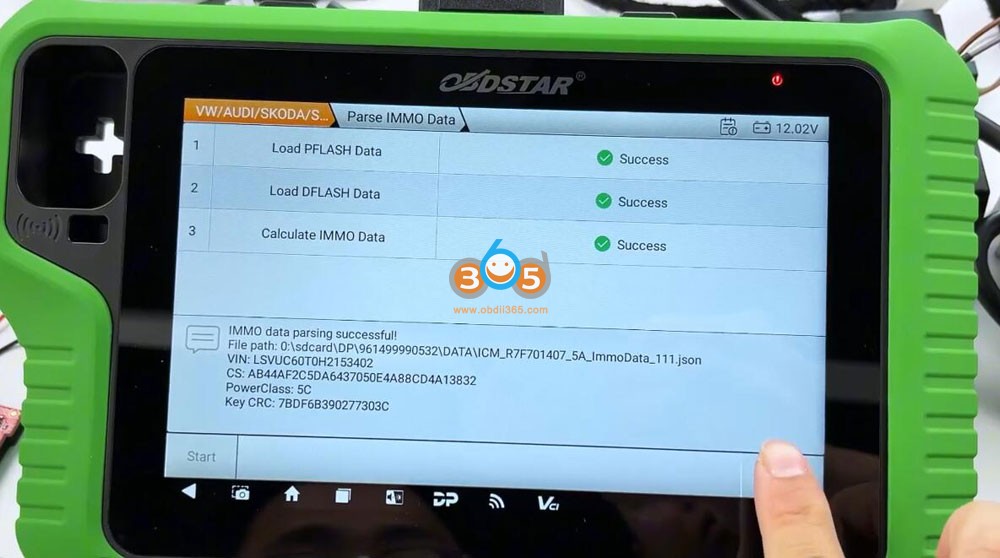
    • Parse immo data. Load Pflash data and Dflash data to calculate immo data. Calculate immo data successfully. Save dash immo data.


B. Read Engine Control Module (ECM) IMMO Data 

  • ECM Model: MED17.5.25 (bench mode).

  • Method:

    • Use the ECM001 dedicated cable (or jumper wires) to connect. ECM-001 makes it easier.

    • Hit Read IMMO data. Read INT flash + INT eeprom data respectively.

    • Select IMMO Data Decryption function. Upload flash and eeprom data to and get CS code. Save the decrypted immo data.

Program VW MQB 5A All Keys Lost with OBDSTAR G3 and RH850 Kit 15

Program VW MQB 5A All Keys Lost with OBDSTAR G3 and RH850 Kit 16

Program VW MQB 5A All Keys Lost with OBDSTAR G3 and RH850 Kit 17

Program VW MQB 5A All Keys Lost with OBDSTAR G3 and RH850 Kit 18

Program VW MQB 5A All Keys Lost with OBDSTAR G3 and RH850 Kit 19

Program VW MQB 5A All Keys Lost with OBDSTAR G3 and RH850 Kit 20

Program VW MQB 5A All Keys Lost with OBDSTAR G3 and RH850 Kit 21

Program VW MQB 5A All Keys Lost with OBDSTAR G3 and RH850 Kit 22

C. Read Transmission Control Module (TCM) Data 

  • TCM Model: DQ380 (0DE).

  • Method:

    • Connect TCU via OBDSTAR TCU adapter via P004 adapter or jumper wires (through wiring diagram).

    • Read flash and eeprom data of the DQ380.
      Then select IMMO Data Decryption function.
      Decode CS code.
      Save TCU immo data.

Program VW MQB 5A All Keys Lost with OBDSTAR G3 and RH850 Kit 23

Program VW MQB 5A All Keys Lost with OBDSTAR G3 and RH850 Kit 24

Program VW MQB 5A All Keys Lost with OBDSTAR G3 and RH850 Kit 25

Program VW MQB 5A All Keys Lost with OBDSTAR G3 and RH850 Kit 26

D. Collect ELV (Electronic Steering Lock) Data 

  • Method 1: Use the ELV data collector via OBD or bench if remove the ELV module from vehicle (no soldering).

  • Method 2: Manual extraction via RH850 adapter (soldering required). OBDSTAR will show you connection instruction.

  • In this case, the OBD method was used, and authentication data was calculated via the server.

Program VW MQB 5A All Keys Lost with OBDSTAR G3 and RH850 Kit 27

Connect the MQB collector to the ELV module according to the diagram.

Program VW MQB 5A All Keys Lost with OBDSTAR G3 and RH850 Kit 28

Program VW MQB 5A All Keys Lost with OBDSTAR G3 and RH850 Kit 29

Program VW MQB 5A All Keys Lost with OBDSTAR G3 and RH850 Kit 30


Read and save ELV immo data.

Program VW MQB 5A All Keys Lost with OBDSTAR G3 and RH850 Kit 31

Note:
If the dashboard, ECM, TCM or ELV is not original, such as a replaced module which has not been programmed online at the dealer service or IMMO OFF directly, it will not be able to calculate the ELV IMMO data.


Step 3: Calculating Synchronization Code

  1. Load all extracted data:

    • Dashboard data

    • ECM data

    • TCM data

    • ELV data

  2. The OBDSTAR G3 calculates the sync code (starting with the VIN).

  3. Verify and confirm the data before proceeding.

Program VW MQB 5A All Keys Lost with OBDSTAR G3 and RH850 Kit 32

Program VW MQB 5A All Keys Lost with OBDSTAR G3 and RH850 Kit 33

Program VW MQB 5A All Keys Lost with OBDSTAR G3 and RH850 Kit 34

Program VW MQB 5A All Keys Lost with OBDSTAR G3 and RH850 Kit 35

Program VW MQB 5A All Keys Lost with OBDSTAR G3 and RH850 Kit 36

Program VW MQB 5A All Keys Lost with OBDSTAR G3 and RH850 Kit 37

Step 4: Making a Dealer Key

  1. Load the dashboard immo data and sync code data.

  2. Place a blank proximity key on the induction coil.

  3. The system writes the immobilizer data, making it a dealer-recognized key.

Program VW MQB 5A All Keys Lost with OBDSTAR G3 and RH850 Kit 38

Program VW MQB 5A All Keys Lost with OBDSTAR G3 and RH850 Kit 39

Step 5: Programming the New Key

  1. Reconnect all modules and plug the OBDSTAR G3 into the OBD port.

  2. Select “Program Keys” and Load the dashboard IMMO data

  3. Place the key near the ignition coil and press the ignition button.

  4. The dashboard updates from “0 keys” to “1 key”, confirming success.

Program VW MQB 5A All Keys Lost with OBDSTAR G3 and RH850 Kit 40

Program VW MQB 5A All Keys Lost with OBDSTAR G3 and RH850 Kit 41

Program VW MQB 5A All Keys Lost with OBDSTAR G3 and RH850 Kit 42

Program VW MQB 5A All Keys Lost with OBDSTAR G3 and RH850 Kit 43

Verification & Testing

  • Test the remote functions (lock/unlock).

  • Confirm the engine starts with the new key.


Done.


http://blog.obdii365.com/2025/04/27/obdstar-g3-program-vag-mqb-5a-all-keys-lost-with-rh850-kit/